Catch every supplier overcharge before you pay it.
Hibe's Suppliers Agent matches every incoming invoice against the original purchase order, the job it was tied to, and the price you were quoted — flagging overcharges, duplicates, and missing credits automatically.
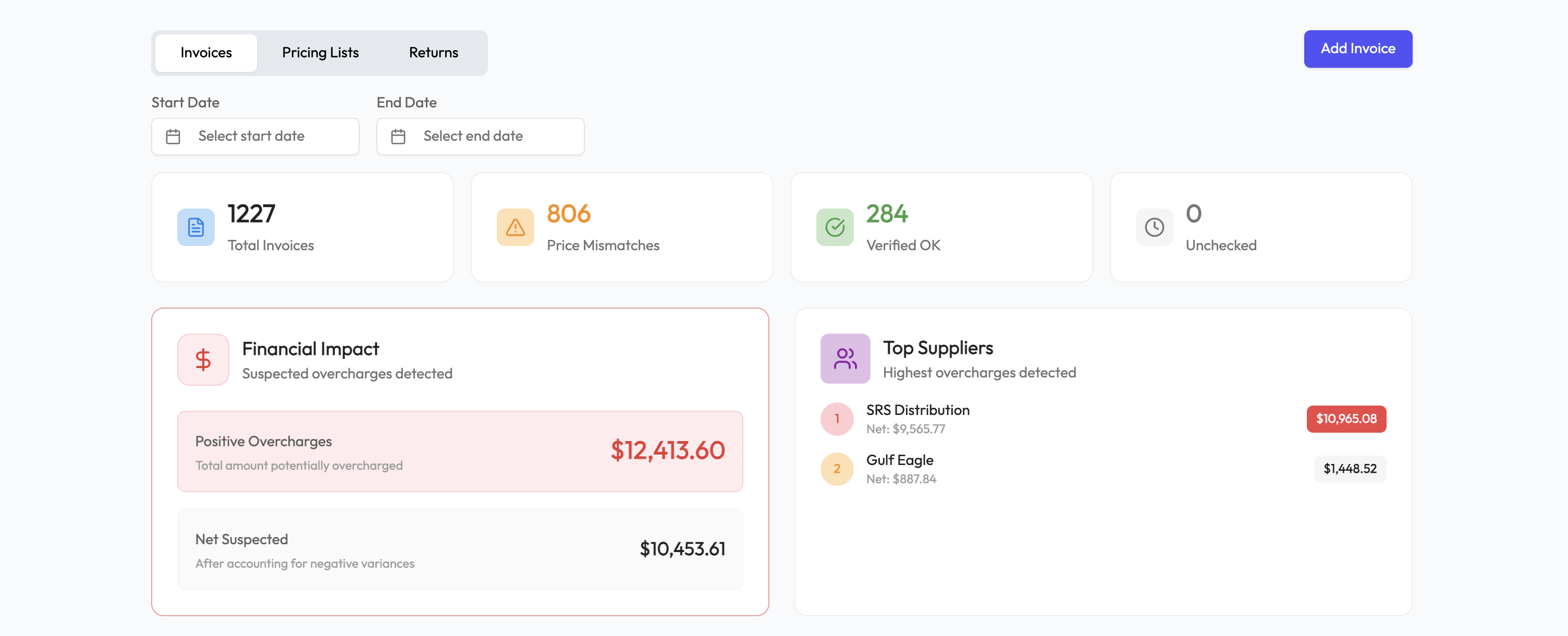
Supplier invoices arrive by email, PDF, and paper. Nobody has time to cross-check every line against the PO and the delivery ticket, so 2–5% of invoices contain overcharges, duplicates, or unbilled credits that flow straight through AP.
Hibe's Suppliers Agent ingests every invoice, matches it line-by-line to the PO and the job it belongs to, and flags anything that doesn't reconcile before the payment goes out.
What Invoice Verification does
Line-item matching against the original purchase order
Overcharge and duplicate-invoice detection
Job-level material cost tracking
Payment schedule enforcement
Automatic exception routing to AP
The ROI
1–3%
Typical overcharge recovery
of annual supplier spend
15–25 hrs/wk
AP hours saved
for a $10M contractor
< 60 days
Payback period
for most Starter customers
Invoice Verification for your industry
How to put Invoice Verification into operation
Hibe's Suppliers Agent ingests every invoice, matches it line-by-line to the PO and the job it belongs to, and flags anything that doesn't reconcile before the payment goes out. A controlled rollout connects that capability to the records and approvals your team already trusts, then measures whether the workflow produces the expected operational return.
The right rollout is deliberately narrow at first. It proves that the data, ownership, and economics work for your team before the workflow expands. Use the six steps below as a practical review with the people who own the process and the people who approve its financial result.
Step 1
Document the current baseline
Write down how the work happens today before changing it: who starts it, which system holds the source record, where approvals happen, and how an exception reaches the right person. For home improvement operations teams, the useful baseline includes time spent, error frequency, dollars delayed or lost, and the number of handoffs. Without that baseline, a smoother demo can look successful even when the underlying operating result has not changed.
Step 2
Start with trustworthy source data
Identify the records that must agree before Invoice Verification can be automated. Typical inputs on this page include Line-item matching against the original purchase order, Overcharge and duplicate-invoice detection, Job-level material cost tracking, Payment schedule enforcement. Assign an owner to each source and decide what happens when a required field is missing. Hibe should make incomplete data visible; it should not silently invent an answer. This step keeps automation auditable and gives finance, sales, and operations the same definition of a clean record.
Step 3
Run a controlled first workflow
Choose one team, branch, or repeatable workflow and run it in parallel with the current process for a short validation period. Review every exception and compare the result with the existing method. A focused rollout lets the team tune approval thresholds, ownership, and notifications without creating organization-wide disruption. Expand only after the people responsible for the result trust what they see and know how to correct an exception.
Step 4
Design the exception path
Automation is most useful when routine work disappears and unusual work becomes obvious. Define which cases can proceed automatically, which need a manager, and which must stop for finance or executive review. Give every exception an owner and a due time. For home improvement operations teams, that means fewer status meetings and fewer spreadsheet audits because the queue itself shows what needs judgment, what is waiting, and what has already cleared.
Step 5
Measure operating outcomes
Track business results, not login counts. Relevant signals include Typical overcharge recovery: 1–3%, AP hours saved: 15–25 hrs/wk, Payback period: < 60 days. Review them against the baseline at 30, 60, and 90 days, and separate one-time cleanup gains from recurring improvement. If a metric does not move, inspect the workflow before adding more automation. The goal of Invoice Verification is a durable operating change that the team can explain in dollars, hours, speed, or fewer disputes.
Step 6
Expand without losing control
Once the first workflow is stable, reuse its data definitions, approval rules, and reporting cadence for the next team. Keep a named owner for each integration and review access whenever roles change. A measured expansion protects the early gains while giving leadership a consistent view across branches. It also makes future improvements faster because the company is building on one operating model instead of creating another disconnected process.
Questions about Invoice Verification
How does Hibe get my invoices?
You forward supplier invoices to a dedicated email address, or connect your accounting inbox. Hibe parses PDFs, images, and email bodies automatically.
Do I still need to approve payments?
Yes — Hibe flags exceptions and posts a clean, matched invoice to your AP queue. Approval workflow stays with your team.
Which suppliers does this work with?
Any supplier that sends invoices via email or PDF. We've validated it with ABC Supply, Beacon, SRS, and hundreds of regional distributors.
What if the invoice doesn't have a PO?
Hibe can match against the job, the material list, and historical pricing patterns. Anything ambiguous is routed to a human for review.
See Invoice Verification on your own data
A 30-minute demo walking through Invoice Verification on your real invoices, comp plan, or jobs — whichever fits.
Schedule Demo